
Microsoft has informed users who have installed Microsoft 365 from the Microsoft Store that this method of installation will no longer be supported. It is advised that users switch to the Click-to-Run version, which is utilized in the official Office installer, to ensure continued access to new features and security updates.
When is the support going to end?
Microsoft has confirmed that the current schedule is in motion. Updates for new features have not been released since October 2025, and security updates have ceased in December 2026. Following this, the version from the Microsoft Store will still function, but it will lack security updates and enhancements.
What sets Microsoft Store apart from Click-to-Run?
While both versions of Microsoft 365 appear identical to users, they operate differently. The Microsoft Store version utilizes the Appx application format and receives updates through the Windows engine.
The Click-to-Run version, provided by Microsoft, installs applications through streaming and minimal updates from the company’s servers, enabling quicker release of new features and aiding in business administration.
According to Microsoft, this model provides improved compatibility with corporate tools like Microsoft Intune, Configuration Manager, and shared environments.
In recent times, the package has been getting frequent updates, particularly with AI-based features like Microsoft Copilot. Microsoft claims that the Click-to-Run template speeds up the distribution of these updates compared to the Store version, which relies on the Windows upgrade cycle and is slower.
How can you determine which edition you are using?
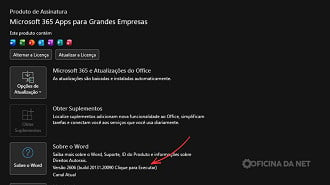
Identifying the type of installation on your computer can be easily done by following these steps.
- Open any Microsoft 365 program like Word or Excel.
- Select File.
- Access Account.
- Look for the information located beside the About button.
If you see Click-to-Run, you are on the correct version and no action is required. However, if Microsoft Store is displayed, you must switch before support ends.
How to transition to Click-to-Run version
Microsoft has significantly streamlined the process of migration. Here’s a guide on how to proceed:
- Close all applications in the Office suite.
- Visit the authorized Microsoft 365 download page.
- Log in using the Microsoft account associated with your license.
- Download the authorized Microsoft 365 setup.
- Execute the file.
The installer can identify the current Microsoft Store version, uninstall it, and install the Click-to-Run edition seamlessly without requiring manual Office uninstallation. User data and settings remain intact during the migration process.
Source

