
Microsoft is continuing to let down Windows 11 users by adding a new requirement that makes it more difficult to access the system. They have been ramping up testing to prevent installation of Windows 11 with only a local account, without needing an internet connection or logging into Microsoft services.
Windows 11 Home now mandates a Microsoft account setup at the beginning, while advanced users can still find ways to avoid this necessity in Windows 11 Pro using specific shortcuts and commands.
Microsoft has eliminated various alternative methods in trial versions, such as “oobe\bypassnro” and “start ms-cxh,” which were commonly used to set up local accounts during installation. As a result, users are now required to have an online account to install the system, a change that not everyone supports.
Why are users upset?
Many users are concerned about the lack of options regarding the Microsoft account rather than its presence. In various online discussions, PC owners have expressed frustrations about the mandatory nature of the account, citing privacy concerns, limitations on offline installations, and the compulsory creation of an online account even on shared or work computers that are primarily used locally.
Automatic activation of features such as BitLocker on compatible devices can be worrisome because if users forget their credentials, they may have trouble accessing the computer due to the recovery key being connected to their Microsoft account.
The conversation intensified following issues stemming from the June update of Windows 11, KB5094126. Users experienced boot failures, blue screens, and BitLocker key requests post-update. The need for a Microsoft account for system access recovery has also raised concerns.
The company is implementing a requirement to restrict internet access in the facility to prevent users from skipping crucial steps during the initial setup process, which may result in the computer lacking essential features like OneDrive, Microsoft 365, cloud synchronization, and automatic backup of settings.
Not everyone at Microsoft shares the same opinion.
Not all individuals at Microsoft support the requirement, as indicated by Scott Hanselman’s comments regarding a potential change related to the Microsoft account requirement for Windows 11 installation. Despite this, no official announcement has been made by the company.
The elimination of bypass methods is currently limited to Insider versions, but it is likely to be extended to upcoming stable system versions.
Microsoft’s requirement of connecting Windows to an online account is a way to enhance their services and subscription system, but it is seen by some as a debate between convenience and computer control.
Update KB5094126 is causing frustration among users.
Microsoft has frustrated its users by consistently releasing buggy updates, such as the KB5094126 update from last week.
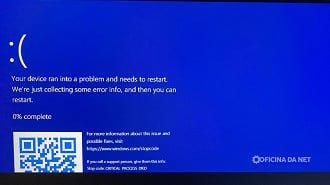
Some HP computers experience issues with Windows 11 startup, resulting in a blue screen or prompting entry of the BitLocker recovery key for access.
Reports have emerged about issues with the File Explorer, including problems with OneDrive syncing and the service folder in the Windows sidebar showing as empty or behaving erratically.
Companies are encountering challenges following the update, with certain enterprise applications and managed environments not functioning correctly, particularly on systems with stringent security measures and integration with BitLocker.
Among the issues that have been documented thus far include:
- BSOD occurs after the update is installed.
- Entry into BitLocker recovery mode occurred unexpectedly.
- Some HP notebooks are experiencing boot failures.
- OneDrive synchronization issues in File Explorer.
- Enterprise applications are not functioning properly.
- Facilities that experience crashes or malfunctions while updating.
Has Microsoft acknowledged the issues?
Microsoft has not yet addressed these problems on the official Windows 11 “known issues” page or initiated a public investigation into the reports.
It is possible that the company is reviewing telemetry data before making an official statement in response to complaints that started surfacing a few days after Patch Tuesday’s release.
The KB5094126 update is essential as it addresses crucial security issues, so it is advisable not to uninstall it right away unless the computer is experiencing severe issues hindering regular operation.
What steps should be taken if your computer has been impacted?
If you encounter issues after installing the update, you can take some basic steps to address them. Although Microsoft does not acknowledge the problems, it is advisable to save the BitLocker recovery key in your Microsoft account to prevent any limitations while waiting for a potential fix.
Backup important files before starting any task. Check for new updates or drivers on Windows Update. If the system doesn’t start, access the Windows Recovery Environment.
Consider removing the KB5094126 update through recovery mode if you encounter any issues right after installation.
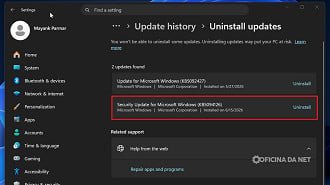
Corporate users should refrain from removing the update until they receive guidance from the IT team, as uninstalling it may impact security and compliance protocols.
Please provide the text you would like me to paraphrase.
