
Many individuals are gathering outfits to fill their World Cup collection, but those who have installed Windows 11 appear to be encountering various issues. Following reports of blue screen errors, BitLocker malfunctions, OneDrive problems, Media Creation Tool glitches, and Office package conflicts, Microsoft has revealed a new problem related to the KB5094126 update, this time affecting the Recycle Bin.
What is the current situation with the Windows 11 Recycle Bin?
The issue impacts the pop-up window that appears when the user attempts to delete a file from the Recycle Bin.
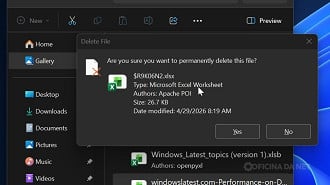
Windows shows a different and apparently random name instead of the actual file name that will be permanently deleted, which can be alarming to users as it may seem like a different file is being removed.
Microsoft guarantees that the data stays secure despite any confusion. The company states that any errors are merely visual and do not impact the deletion process. The chosen file is deleted accurately, even if the message shows an incorrect name.
The Recycle Bin does not permanently remove incorrect files, although the confirmation window may give you that impression.
Which Windows versions are impacted?
The issue was discovered following the installation of the security updates released in June 2026 and is not exclusive to Windows 11.
The bug impacts various Windows versions that are currently supported by Microsoft, such as Windows 11, Windows 10, and certain Windows Server editions. For Windows 11, the issue is linked to the KB5094126 update, which is available for the 24H2 and 25H2 versions of the operating system.
June Patch Tuesday became a source of trouble.
The interesting aspect is that the June update introduced new features like enhanced performance in the Start menu, quicker searches, audio sharing among Bluetooth devices, and overall system enhancements.
Shortly after being launched, issues started to surface in various parts of Windows.
The current list of confirmed bugs includes:
- Blue screen of death, also known as BSOD.
- BitLocker recovery key requests that are not anticipated.
- Some laptops are experiencing issues with booting up.
- OneDrive synchronization issues.
- Issues with Media Creation Tool.
- Breaks connection between Microsoft Office and business software applications;
- Failures can occur in the Start menu and system search in certain situations.
- Errors found in the Recycle Bin confirmation window.
Many users advise being cautious before installing the update, especially in corporate settings, due to the complexity of the situation.
Is there a resolution available?
Microsoft has acknowledged the issue with Lixeira and is currently developing a solution, but has not announced a specific release date for the patch yet.
It is advised to refrain from deleting crucial files directly from the Recycle Bin until the bug is fixed. Prior to confirming deletion, carefully check the Recycle Bin’s contents if you must delete something permanently.
If you haven’t installed KB5094126 and rely on your computer for work, it may be wise to hold off for a few more days to allow Microsoft to address this series of issues.
How to verify if the update is installed on your computer?
To verify whether your computer has received the June patch, follow this route:
Settings > Windows Update > History of updates
Search for the cumulative updates that were applied on June 9, 2026. If you encounter issues when trying to open Office files from external software, it is probable that this issue is linked to the mentioned bug.
What other problems does the KB5094126 update have?
The most severe issues occur shortly after the update is installed, based on the reports gathered thus far.
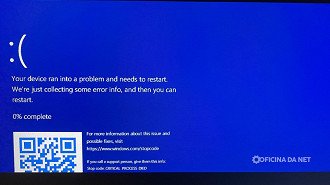
Some HP computers may encounter issues with Windows 11 startup, leading to a blue screen error or automatic entry into the BitLocker recovery screen that demands a recovery key for access.
Reports indicate issues with File Explorer, including OneDrive sync problems and empty or unstable service folder in Windows sidebar.
Companies are encountering challenges following the update, particularly with enterprise applications and managed environments that are not functioning correctly, especially on systems with stringent security measures and integration with BitLocker.
Some of the issues that have been documented include:
- BSOD occurs following the update installation.
- Entry into BitLocker recovery mode occurred unexpectedly.
- Some HP notebooks are experiencing boot failures.
- File Explorer facing issues with syncing on OneDrive.
- Enterprise applications are not functioning properly.
- Facilities experiencing crashes or malfunctions while updating.
Has Microsoft acknowledged the bugs?
Microsoft has not yet addressed these concerns on the official Windows 11 “known issues” page or initiated a public investigation into the reports.
The company may be reviewing telemetry data before making an official statement, as complaints started to surface shortly after Patch Tuesday was released.
The KB5094126 update is essential because it addresses important security issues. It is advised not to uninstall it right away unless the computer is experiencing significant problems that hinder its normal operation.
Any updates regarding the KB5094126 update?
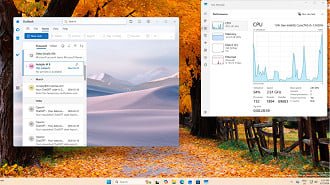
The update introduced various new features despite some issues. One notable addition is the Low Latency Profile, designed to enhance the responsiveness of Windows 11 during specific tasks. This feature allows the system to boost processor performance temporarily when opening apps or navigating system sections like the Start menu and Action Center to minimize lags and potential crashes.
This can be most noticeable on computers that were beginning to slow down. While it won’t upgrade the processor, it can improve system responsiveness for tasks like opening programs, switching windows, and browsing menus.
The camera is now able to function simultaneously in multiple applications.
The Multi-App Camera feature allows users to use the webcam for multiple applications simultaneously, unlike the previous limitation of one app at a time on Windows.

chsyys/Flickr
Windows 11 now supports multiple applications accessing the camera at the same time, which is beneficial for tasks such as live streaming, virtual classes, online meetings, and using accessibility tools.
Microsoft included a simple camera mode to address issues with webcam performance, making camera operation easier and potentially fixing stability issues on certain devices.
Now you have distributed audio
The update includes Shared Audio, a function that enables playing sound simultaneously on two devices. This feature can be handy for scenarios where two individuals want to watch a video on a laptop with separate headphones.
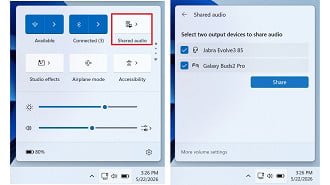
chsyys/FreePik
Many individuals have attempted to divide audio on Windows using adapters, manual adjustments, or third-party apps. The new idea is to simplify this process within the system itself.
Availability of the novelty may differ based on the hardware and audio drivers of the computer, so not everyone will experience it the same way initially.
File Explorer search gets better
The Archives Explorer has been improved to show search results with fewer characters entered, making it quicker to find documents, images, videos, and folders.
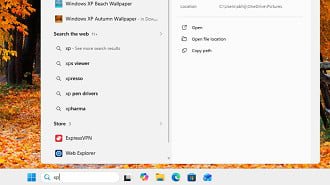
Users of Windows who handle numerous files are familiar with the fact that the search function in Explorer is not consistently quick or precise. Microsoft is continuing to make progress in this area, with the June update showing some improvement, at least to some extent.
The company continues to make changes to the Explorer to improve flexibility and reliability, including updates to handle long file names and search behavior.
Task Manager displays improved utilization of NPU.
Microsoft is increasingly focusing on NPU chips for artificial intelligence tasks in newer computers, with the Task Manager now providing improved visibility of this component during the June Patch Tuesday.
For individuals using a standard PC without an NPU, there is no significant impact. However, the difference is notable for newer laptops, particularly the Copilot+ PCs. This allows users to monitor when AI functionalities utilize the specialized chip instead of depending solely on the processor or video card.
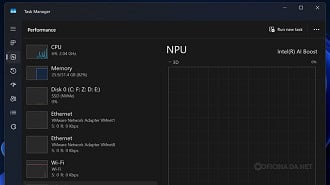
This information provides greater transparency regarding Windows for individuals interested in performance, battery usage, and hardware.
Microsoft also transitioned to Secure Boot.
The June update includes significant modifications to Secure Boot, a security feature designed to safeguard the computer’s boot process, in addition to the visible news.
Microsoft is getting ready to update Secure Boot certificates due to the expiration of some certificates used on Windows devices starting in June 2026. PCs without the new certificates will still operate normally, with updates being delivered gradually via Windows Update.
Virtualization and gaming error fix
The KB5094126 update addresses an issue that could lead to error screens on certain computers following the installation of the optional update KB5089573. This problem was associated with system reboots, virtual machines, and certain games.
Microsoft has identified errors such as HYPERVISOR_ERROR and KMODE_EXCEPTION_NOT_HANDLED, which can cause concern for users when they appear on blue screens or lead to more severe system issues.
The company states that this issue was fixed in the June update. It may be crucial for those experiencing instability following the optional May update to install the Patch Tuesday.
Custom folders may experience icon loss under certain circumstances.
Microsoft has also made a security update regarding how Windows handles desktop files.
Some users might observe that custom icons or folder names specific to a location may not display accurately in downloaded content from the internet or remote sources. The company assures that access to folders remains unaffected, indicating that the files are still present; the issue is merely visual.
AI elements have been recently revised.
Microsoft has also made improvements to the internal elements of Windows 11, such as features related to image search, content extraction, semantic analysis, and configuration model.
These modifications are aimed at readying the system for more advanced features, particularly on computers that support local AI capabilities. Users may not always immediately notice this kind of update, but it is part of Microsoft’s plan to transform Windows 11 into a more unified platform with AI technology.
Source | Via

